
A. Portal
1. On Main Webpage under Shop option –> Search Category – How does it work?
Webmaster – Search option works for the Product Title only, not for the category names.
2. If existing Customer already buy 1 AMC then system doesn’t allow to apply for other AMC?
Webmaster – Now Customer can buy more than one subscription.
3. If Customer buy AMC products, Where we can share AMC Policy /Contract (Pdf)?
Webmaster – Customer can download the AMC Policy/Contract (Pdf) after purchasing the subscription from front End at My Account >> Downloads. https://www.japman.co.in/my-account/downloads/
4. Where is Subscriber option On Japman’s website?
Webmaster – Subscriber category for people who has registered to comment/review on your products. Or find on direct Webpage.
5. None of Cx AMC start date – end date, not even option of Cost/total amount received, No option for Invoice no/Order/Reference no.
Webmaster– It should be working now. Please make sure customer email is not amrjit.singh@japman.co.in As we are using this email for sending emails to customer. You can change the sender email address at https://www.japman.co.in/wp-admin/admin.php?page=wc-settings&tab=email.
6. Where is reporting features of AMC?
Webmaster – You can check the details at below link
https://www.japman.co.in/wp-admin/edit.php? post_type=sumosubscriptions.
Admin Panel >> SUMO Subscriptions >> List of Subscriptions.
7. What is regenerate download permission, how we can use it?
Webmaster – This option is applicable to downloadable / virtual products like e-Books.
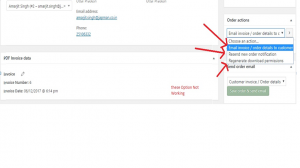
8. Order number- 1173/ initially customer paid full amount after customer requested to refund the amount or cancel the order. So we rose to cancel his order. After entering amount – Whether it will refund amount automatically to Cx account from Current account or/ do we need to login in bank website require to do manual transaction…?
After Raising…refund request, we are unable to see refund Invoice???????
Webmaster – Refund option is not very useful for your site as PayUMoney doesn’t support Refund button on website. If you would like to refund the amount then you need to login to your PayUMoney account (If the customer’s money is still in your PayU account) and refund from there. If PayU has already transferred the money in your account, then you need to transfer manually from your current account.
At below screen shot – How can I check (plus) 3 other notes??
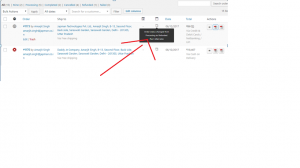
Webmaster – Resolved, please check this feature
9. Under Order no. 1168: unable to use Increase / Decrease stock button?
Webmaster – Stock also needs to be manually corrected as refund will not process from your site itself.
After Launching Website – Need to Inform Webmaster to make things better….???????
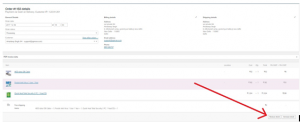
10. There should be one month advance notification about AMC expiry of company or users –
Webmaster – Option created for advance notice. There will be 5 Payment reminders. 30 days, 14 days, 7 days, 3 days and 1 day before the due date. You can check the scheduled reminders at https://www.japman.co.in/wp-admin/edit.php?post_type=sumosubscriptions&page=sumosettings. Resend new order notification should be working now.
11. How we receive payment from Customer’s?
Webmaster – PayU Payment Gateway has been integrated and tested.
12. Can we use Paytm & Bharat QR Code as other mode of payment?
Webmaster – Yes, you will find link at bottom of each Invoice copy.
13. Under Contacts – There should be option to add billing/shipping address or check box option if both addresses are same.
Webmaster – Billing and Shipping Address options are available only for the customers who shop at the website. Under Contacts, it won’t be available. You can find it at https://www.japman.co.in/wp-admin/users.php.Appearance >> Users.
14. Website Users and under CRM Users Are different Category and are they not interlinked? Can we link CRM Customer or Online Customer?
Webmaster – No, we cannot link them because CRM Users are not a default WordPress users and using different SQL database table. While Users under Appearance are default WordPress Users that we define in the main database table.
We will check after launching the website…???????
15. Do we gets any alerts??
Webmaster – YES (Support@japman.co.in)
16. Please explain in detail as i checked there is no option to add Serial Number/Warranty of products after buying products online and Where is “add stock with Serial no.”??
https://www.japman.co.in/wp-admin/admin.php?page=atum-stock-central
Webmaster – Go to Woo commerce >> Orders >> Edit Order >> On the right side, “Add Note” – Select “Note to Customer” from drop down. Add your note with the serial number and that note will be added in the invoice.
But in Packing Slip, (Add your note – Note to Customer) text should be comes before Note & Customer Self Declaration note.
Webmaster – Please check, its done for E-Commerce website but not completed for manual billing???????
17. Did Cx get any notification email about purchase orders And in below screen shot – Order Action & Send Order email buttons are functioning?
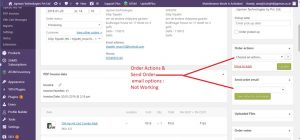
Webmaster – Now its working
18. In Woo Commerce: please add one more header by name of Category in Report Features.
Webmaster – Not very easy to add Category in Reports CSV. Please use Woo commerce >> Product Sales Report. Filter as per your needs and then Export CSV.
19. In Export Excel sheet, find in search SKU (Stock Keeping Unit) 292 in result it shows two items, look at below screenshot.
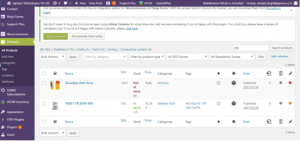
Webmaster – This option is for searching products entire data. So, if it finds anything with 292 in the product, it will display in search results. In the above product, 292 x 172 is the size of the Product image.
20. How Non-Register user work on portal?
Webmaster – For Non-Registered User, customer can contact us through contact form but registration is mandatory for shopping on the site. Remote Support on the bottom left is also visible only after login to the site.
21. Under SUMO Subscription – Not able to find Active, Pause category and even not able to find by Name of Buyer.
Webmaster – To filter in SUMO Subscription, you need to select the month as well as the Active, Pause, etc. Selecting only one won’t do the filter.
Find by Name of Buyer would be a suggestion for SUMO Subscription’s plugin author. We can recommend it to them but it’s not there in the plugin. Only searching with email ID is possible.
22. Under woo Commerce> Sales by product or category: We are not able to get full AMC details. We need report in form of start date, expiry date, product, cost, Buyer name and order ID.
Webmaster – I created an option and we can export reports now at https://www.japman.co.in/wp-admin/admin.php?page=pmxe-admin-manage but that will not include Cost and Buyers Name. We can include other details though. This is how this plugin is developed.
23. Can Vendors and Supplier should be worked together?
like Under ATUM Inventory – Suppliers and Under Accounting – Vendors are different database,
it doesn’t match if we update entry under Accounting – Vendors.
Webmaster – Not possible. They are two different plugins with 2 different database tables.
24. Donation: The checkbox option is complex as it is not a default feature of Woocommerce. If I add a checkbox then it won’t be possible to edit the amount.
Webmaster –Hence, I added a default item in shopping cart as Donation which customer can remove, if he/she doesn’t want to add it.
25. Can we check donation amount report, Year/Month/Day wise??
Webmaster – Created a custom feature. Go to Woocommerce >> Reports >> Sales By Product >> Select Donation to sell sales report. You can also go to Woocommerce >> Product Sales Report and export data.
26. Please share how you set the shipping charges in the website and it is showing for all distance Rs 100 only…
Webmaster – In Delhi, Shipping Charges are Free. But outside Delhi, it is Flat Rs. 100. You can check the shipping settings at Woocommerce >> Settings >> Shipping >> Add Shipping Zone. Over there you can add new shipping zones according to your requirements.
27. What type of web-page would be for customers if customer wants to login in our website?
Webmaster – https://www.japman.co.in/my-account/
B. Accounting
1. Can we update Bharat QR Code file itself linked at Each Invoice Copy?
Webmaster – Please go to https://www.japman.co.in/wp-admin/media-new.php. Admin Panel >> Media >> Add New. Upload your file there and then let me know I’ll update the file URL in the code.
C. CRM – Customer Relationship Management Data
1. Not able to search data thru mobile number in CRM
Webmaster – We can filter Mobile Number via Search Segment but it doesn’t display in the search results. This is not a functionality to display Mobile Number in the list as this one Mobile Number is using a different database table. You can check the Mobile Number by opening the contact.
2. Why Cx always get email from Info@japman.co.in, Can we use other email id or have other option to select mail from support@japman.co.in ?
Webmaster – Go to https://www.japman.co.in/wp-admin/admin.php?page=erp-settings&tab=erp-email a change the email from.
3. Earlier Subscribe option was visible and customer’s data showed under CRM member’s data instead of under CRM Subscriber option.
WebMaster – That was using a different plugin/tool. Not sure which plugin was it. Moreover, can’t use different plugins for CRM in a single site because it will conflict. Able to see Subscribers list under Maintenance mode – View All Subscribers.
4. Under Activities Header – Date & <Correct> Time Should be Visible instead of (clock logo) @ top right side of each activity.
Webmaster – Done, but we Need Date & Time should be Visible. We’ll see if it can be added later. Not an easy to add as this is coming from CSS and different database table. Little complex.
5. Where we can create template for email under company contacts –> under email option –> header?
Webmaster – Go to https://www.japman.co.in/wp-admin/admin.php?page=erpsettings&tab=erp-crm§ion=templates and click “Add Templates” ERP Settings >> Settings >> CRM >> Templates >> Add Templates.
6- Under my Schedules/Task – there should be an option to edit/extend the date/time if required, this option should be editable by who gets task from any other person?
Webmaster – Go to Contact >> Schedule/Tasks >> Click on the task and then click Edit.
7. Under my Schedules if no. of task are created – if i select data – day wise – the data should be visible in time hierarchy not in “(+5 / +2 more option) “ – see below screen shot
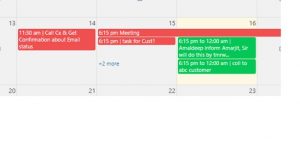
Webmaster – The problem here with the day wise tasks is that they are All day events that is showing +5 more like data as the space defined for All day tasks is at the top. If there is data at certain time on the day then it will show in the list and not with +3 more. That option is there to prevent the page layout.
D. Ticketing
1. Under Tickets Status, Is their any option to find Ticket no#., Customer ID, Mobile, Email, & Home address directly if Cx asking status about ticket?
Webmaster – There is an option using Apply Filter at https://www.japman.co.in/wp-admin/admin.php?page=wp-support-plus
2. In tickets, there should be an option “Type “ of Customer as well and there is no link among Tickets and CRM – Customer Data??
Webmaster – No there is no linking between CRM and Ticketing.
3. If Cx doesn’t respond within 1 week, each ticket should be closed automatically after one week after resolving ticket?
Webmaster – Custom Feature requires additional work.
4. After resolving ticket, Cx should get notification via mail and can we define Email Template?
Webmaster – After resolving the ticket, please make sure to change the ticket status to Resolved and you can modified Email Template at https://www.japman.co.in/wp-admin/admin.php?page=wp-support-plus-email-templates, go to the tab “Change Status” and over there you can edit the email template. Though that email template is applicable to every status change email.
5. Can we show all tickets in Detrimental order in search option?
Webmaster – There is no default option for it but you can use Apply Filter option to achieve that to some extent. The tickets are now showing in Detrimental order with recent ones at top. You can change the order by clicking on the headlines “Status” “Subject” “Raised By” “Type” “Category” “Assigned to” “Priority” “Updated”
6. Unable to filter data according to customer wise, type option only user/guest; please add customer option type as well ?
Webmaster – Click on “Raised By” as it must be customer who raised ticket from Front-end form to filter data customer wise. If agent raises a ticket manually then “Raised By” would be the agent, not the customer.
7. Can we link Users/Customers, so we can find data according to customer id/name of Customer??
Webmaster – name of person/customer who raised the ticket. Click “Apply & Remember” and your filter are ready.
8. In Status bar, can we add Date/Time when ticket was created as Custom Feature?
Webmaster – Done, Date/Time is showing now in ticket list.
9. Is there any option while creating tickets, Cx get to know about working hours of Company and how much time it would take to resolve the issue in hours?
Webmaster – For that purpose, we can go to https://www.japman.co.in/wp-admin/admin.php?page=wp-support-plus-email-templates and in the notification email that a customer receives after raising a ticket with us, we can add details about our working hours and how much time we generally take to reply/resolve ticket. I’ve added a message at top of Support tickets page. Go to this link:- https://www.japman.co.in/support-ticket/.
10. Under Status header – Please add sub heading – “In-progress” along with pending, resolved…n all”. please remove no.1, 2, 3, ….5 n all and please add two more option to Cancel/Refund.
Webmaster – Done.
11. Should i get information about all tickets in this manner if i click status: open (no. of open tickets#): pending (no of pending tickets#): In-progress (no of open tickets#) ?
Webmaster: Double click it and it will do.
12. How we can see status of all tickets?
Webmaster – After clicking Category/Assigned to, you should get all information about tickets, Double click and see result.
13. How could i identify ticket type under all tickets – Public and Private Category of Tickets?
Webmaster – I’ve removed the option from Front end for visitors to allow ticket Public / Private as I tried but it was not coming in the column. Now its showing ticket Public/Private.
14. Where cx can see status about his/her ticket and is it Public/Private?
Webmaster – Click on “Check Status” button in the ticket editor to see/edit whether ticket is Private/Public. Same option is available for customer too in the front-end.
15. Can tickets should be assigned to Enggs. till Cx AMC has expired or / New Cx do not agree to pay for services…via Cash/online – Custom feature?
Webmaster – No, We can disable the front-end Support Ticket form at https://www.japman.co.in/support-ticket/ if customer’s AMC expires.
16. How to generate support ticket via registered mail ?
Webmaster – I am afraid there is no such option. Generating ticket via registered email is a premium feature of that plugin.Visit https://www.wpsupportplus.com/add-ons/ for more info.
17. Can we create ticket online after login with user/customer profile??
Webmaster – Go to https://www.japman.co.in/support-ticket/ and create a ticket.
E. Inventory
1. Can we find Cx assets which he/she gave us for repairing under AMC?
Webmaster – Go to https://www.japman.co.in/wp-admin/admin.php page=wpim_manage_inventory_items and over there you can manage customer’s inventory.
2. How to find out customer assets after finding user name, I think the assets are not linked up with existing customers…
Webmaster – This is a very basic functionality and not linked with the users on the site. I do recommend to use some third-party tool for asset management as there is no custom solution available in WordPress.
3. What is the slug??
Webmaster – Slug is the URL structure. You can leave it blank or same as the product name.
4. Sort order ??
Webmaster – Sort order starts with 0, 1, 2… & so on. It add a filter option based on the sort order at https://www.japman.co.in/wp-admin/admin.php?page=wpim_manage_inventory_items&sortby=inventory_sort_order&sortdir=ASC
Webmaster – You can add more categories at https://www.japman.co.in/wp-admin/admin.php?page=wpim_manage_categories
5. Can Number header automatically add in increasing order?
Webmaster – You are adding numbers at https://www.japman.co.in/wp-admin/admin.php?page=wpim_manage_inventory_items&action=edit&inventory_id=3 and at other inventory items. It just gives you an option to filter. It’s not coming by default.
After saving the entry, it disappear all existing entry for time being…but it comes after refreshing.
Webmaster – I’ll notify the plugin author. You can check the status at https://wordpress.org/support/topic/list-not-correct-after-saving/.
7. Was ATUM inventory installed for testing purposes, Is there any option to export data from it, how can I match Inventory with actual stock we have?
Webmaster – ATUM Inventory is linked with your Woocommerce Shop. So whatever stock you have at your shop will be visible at ATUM Inventory too. Also created a custom feature for exporting Stock at Woocommerce >> Stock Export/Import.
8. Is there any option for Stock maintenance or Sales purpose?
Webmaster – Inventory at https://www.japman.co.in/wp-admin/admin.php?page=atum-stock-central. At this link, on top right you have the option to export data to PDF.
There are online inventory management tools like https://www.zoho.com/in/inventory/ but they won’t be linked to your site. If you want those to be linked then you can keep the Product status as Draft or Private. In that way, it won’t display in the site for sale.